Comparison
A self-hosted Binom alternative
Binom v2 is $149 a month. Roitrack is $69, billed monthly, and you can stop any month.
We sell one of these two, so every Binom number below is theirs, taken off their own price page. You can check all of it in about a minute and we would rather you did.
Price
Binom publishes three products. The two below are the trackers, at their monthly price.
| Plan | Per month | Over a year |
|---|---|---|
| Binom v2 | $149 | $1,788 |
| Binom Cloud | $299 | $3,588 |
| Roitrack | $69 | $828 |
Monthly billing on both sides. Binom's figures read from binom.org/price on 1 October 2026, and again two weeks earlier on 17 September; both reads agreed. The year column is twelve times the month — our arithmetic, their numbers.
Under half the price, and nothing to commit to
$69 against $149 is $80 a month, or $960 a year, for the same job on the same kind of box — your server, your database, one price whatever the volume.
And it is $69 every month rather than $69 once. There is no annual plan to buy, because there is no discount you are missing by not buying one. That matters in the shape this business actually has: a vertical dries up, an account goes down, you take two months off. On monthly billing that costs you nothing.
What $69 includes
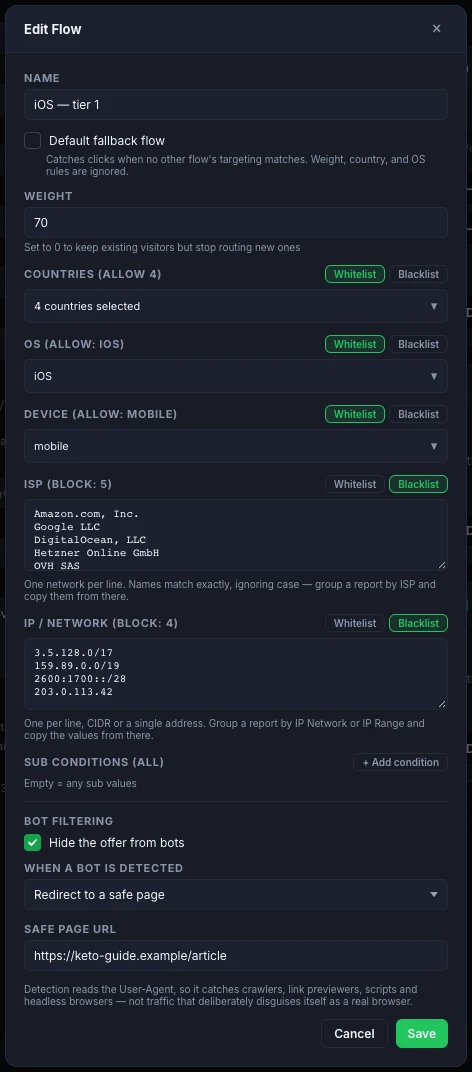
Bot filtering and cloaking, in the tracker. Invalid traffic is detected and named on the click row, and each flow decides what a bot gets: a 404, a blank page, or a safe page you set. Binom sells its bot protection as a separate product, Binom Protect, with its own licence and its own trial. Ours is part of the one price.
It sits with the rest of a flow's rules rather than in a separate product, which is the point of the dialog below: countries, OS and device on a whitelist, hosting companies and their network blocks on a blacklist, and what a bot gets, all on one screen and all on the same flow.
Facebook, both directions. One ads_read token covers every ad account you have — personal, agency, rented, across business managers — with no account IDs to paste and no list to keep in sync. Yesterday's spend lands in your own database daily, and accounts billing in different currencies are each converted to USD at a rate pinned to that day. The Conversions API runs the other way: when your network fires a postback for a deposit or an approved lead, that becomes an event on your pixel, so Facebook optimises toward the payouts you were actually paid for.
Domains that handle themselves. Add one and the certificate issues itself — Let's Encrypt, or full Cloudflare mode with the DNS record created over their API from a zone ID and a token. Bulk-add a list at once. Live certificate status, so an expiry never surprises you.

Reports that reach the network, not just the zone. Group a report by the visitor's ISP, or by the block their address sits in — not a round /24, but the range their operator actually announces. A hundred clicks calling themselves phones out of one hosting company's block is a single row. Select those rows, copy the values, and paste them straight into a flow's block list.
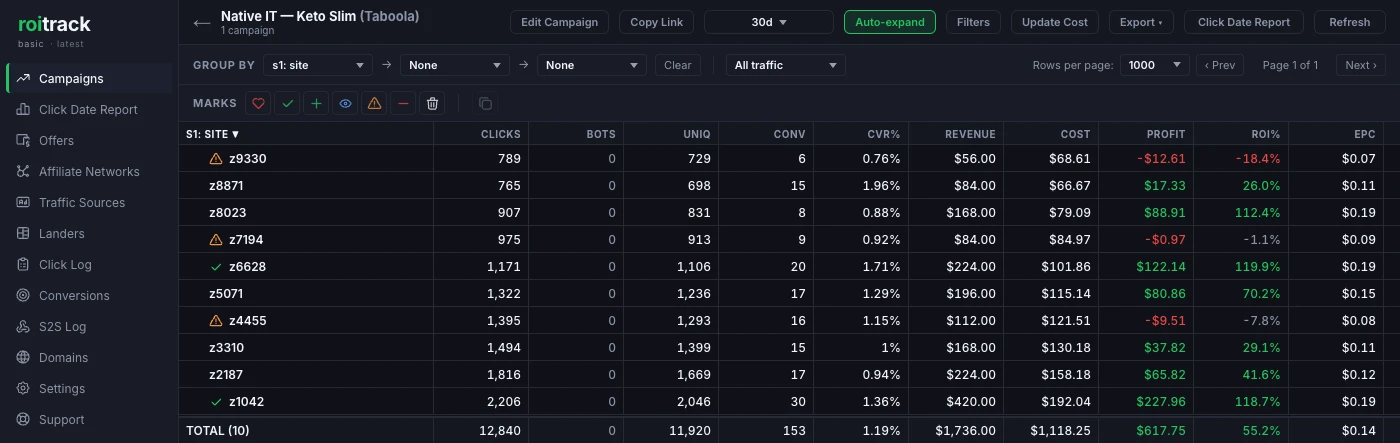
And the report remembers what you decided. Pin a coloured mark to any row — a site, a zone, a lander, a country — and it stays on that value through regrouping, drilling in and changing the dates. Marks are per campaign, because a zone id only means something inside the campaign that bought it. Click a mark with nothing selected and the table filters to it.
One plan, and nothing counted inside it
$69 a month is the whole price at any size:
- Unlimited clicks and conversions
- Unlimited domains and users
- Unlimited campaigns, offers and landers
- Monthly billing, cancel any month
- Cancel and your data stays put — it was never on our servers
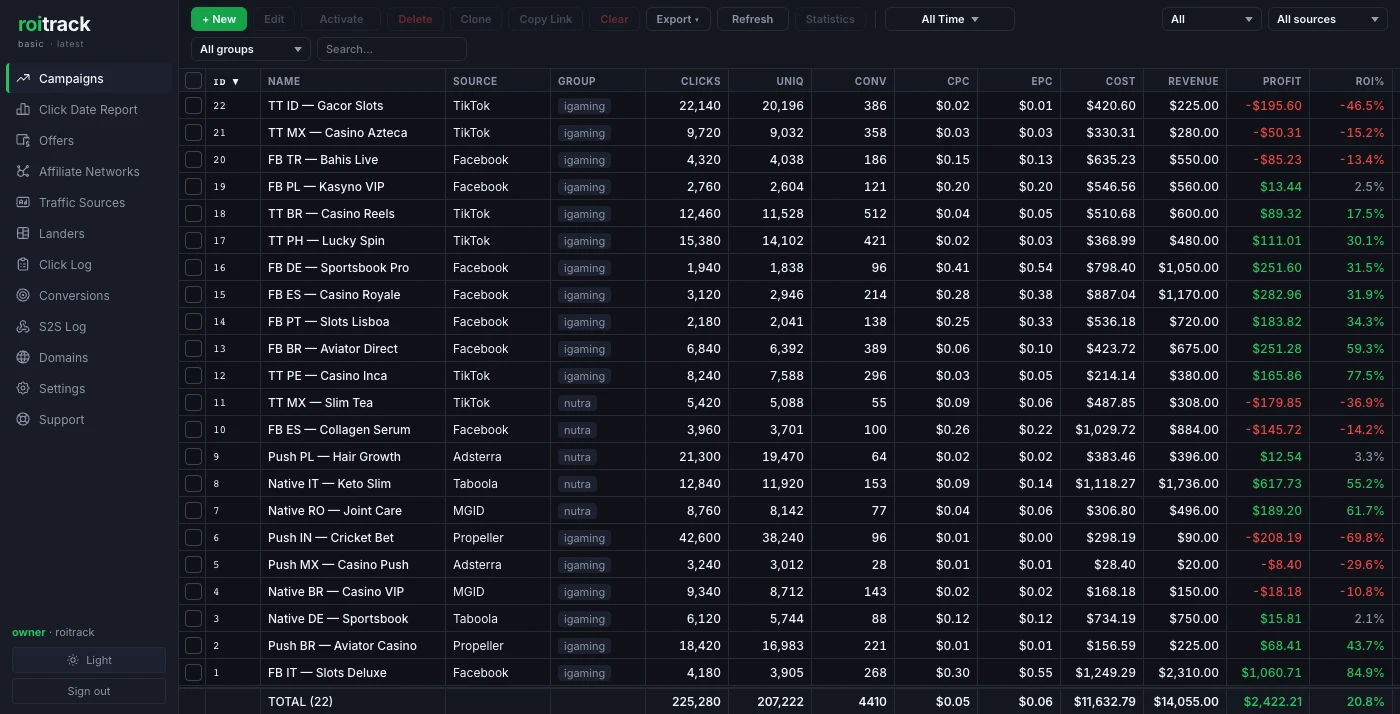
A campaign that unexpectedly works does not produce an unexpected invoice, because there is no tier above this one. The plan badge in both screenshots above reads basic because that is the only paid plan there is.
Typical redirect is 1.6 ms, measured on the minimum spec rather than estimated. Worst 1% is under 10 ms, and sustained throughput is 1,000+ clicks a second.
Fifteen minutes to your first tracked click
Point a domain at a fresh Ubuntu 24 VPS, paste one command, add a source and an offer, launch a campaign. Updates ship through the interface afterwards — one click, no SSH.
Any traffic source or affiliate network works through URL templates and macros: ten pass-through sub IDs you name yourself, a cost macro, and an S2S postback back from the network. If it can fire a postback, it works here, and nothing needs an integration built for it first.
Runs on any VPS from any provider, roughly $10–15 a month; Ubuntu 24, 2 vCPU / 4 GB minimum.
Try it before you move anything.
14 days, the full version, no card. We set trials up by hand rather than through a signup button, so you get a person rather than a form — usually within the hour.
Get a trial on Telegram See what it does
Or email [email protected]. Something on this page wrong or out of date? Tell us and we will fix it.